
One of the best ways to learn about circuits and resistance is by building circuits – either in the classroom or using an online simulation. I’ve previously recommended PhET DC Circuit simulation, which (despite some non-standard circuit symbols) is still a great way to take measurements that demonstrate concepts such as Ohm’s Law. You can find the PhET DC circuit simulator at https://phet.colorado.edu/en/simulation/circuit-construction-kit-dc-virtual-lab – just click the play button to load the simulator.
More recently, I’ve come across another circuit simulator that has a major advantage in forcing you to build right-angled circuits. This may sound like a minor feature but presentation is important! There are some disadvantages, such as only having one ammeter and the voltmeter being represented by its connections rather than being shown as an actual device, but there are also some really nice touches – such as the lamp burning out if it is overloaded.
To access the simulator, go to https://www.golabz.eu/lab/electrical-circuit-lab then select Preview (top right). Don’t worry if you get an error message saying that collaboration is not enabled: you don’t need it to build your own circuits. Then just drag components from the component area (on the right) into the circuit board area (centre).
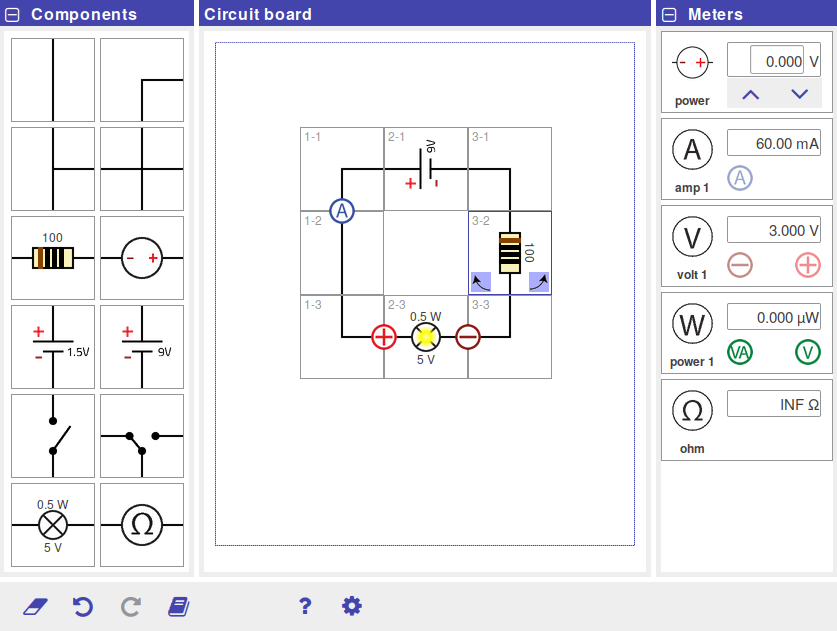
Th circuit simulator shown above is from a suite of online learning tools developed through the EU go-Lab initiative. An index of the full range of simulations can be found at https://www.golabz.eu/labs. An alternative list is available at https://go-lab.gw.utwente.nl/production/ – simply select the golabz preview option for standalone use.

 Mr Tarrant's physbang 'blog
One thought on “Online Circuit Simulators”